Who is this for?
Perfect for HR teams and recruiters who want to maintain professionalism and timely communication with candidates, even during high-volume recruitment periods.
What problem is this workflow solving?
After interviews, many recruiters forget or delay sending rejection messages to candidates. This can leave applicants waiting without feedback, creating a poor candidate experience and damaging the company’s employer brand.
What this workflow does
- This workflow automatically notifies rejected candidates through both email and WhatsApp:
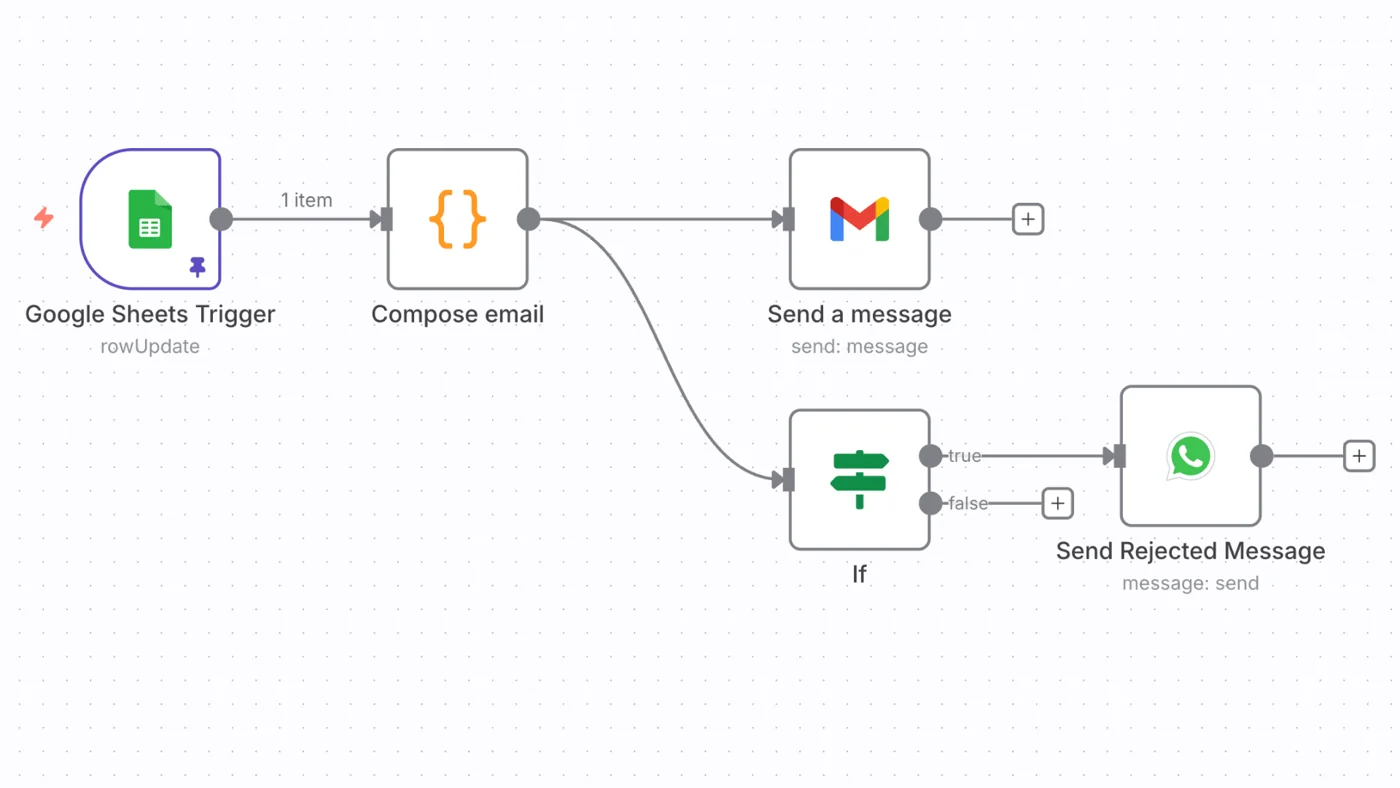
- When the candidate’s status in your Google Sheet changes to “Rejected,” the workflow is triggered.
- It composes a personalized rejection email and sends it via Gmail.
- It simultaneously sends a short, polite rejection message to the candidate’s WhatsApp number.
- This ensures every candidate receives timely communication - no manual follow-up needed.
How to set up this workflow?
Built with n8n, this workflow connects Google Sheets, Gmail, and WhatsApp API.
Simply:
- Link your applicant tracking Google Sheet.
- Connect Gmail and WhatsApp accounts.
- Customize the message templates once, then activate the workflow.
How to customize this workflow to your needs
- Modify message content for different stages (e.g., “Rejected after interview” vs. “Not shortlisted”).
- Add HR notifications (e.g., Slack or email alerts when messages are sent).
- Integrate with your Applicant Tracking System (ATS) to sync candidate status automatically.
Need help customizing?
Please contact hello@icts.io for any custom request.